Logik Portable Air Conditioner Error Codes


Logik Portable Air Conditioner Error Codes
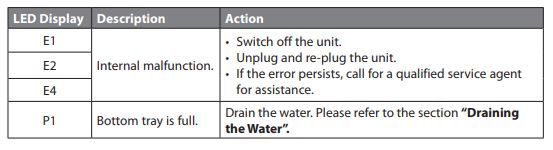
LED DisplayDescription
E1 Internal malfunction. Switch off the unit. Unplug and re-plug the unit. If the error persists, call for a qualified service agent for assistance.
E2Internal malfunction. Switch off the unit. Unplug and re-plug the unit. If the error persists, call for a qualified service agent for assistance.
E4Internal malfunction. Switch off the unit. Unplug and re-plug the unit. If the error persists, call for a qualified service agent for assistance.
P1Drain the water. Please refer to the section “Draining the Water”.
Logik Portable Air Conditioner Fault Codes List

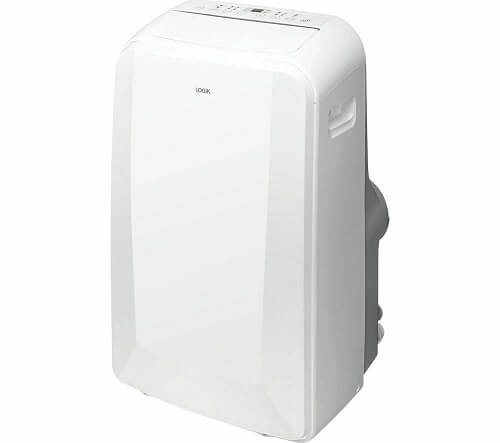
LOGIC Portable Air Conditioner Troubleshooting
LOGIC Portable Air Conditioner Troubleshooting

Problem: Unit does not start or there is no power when pressing on the unit or ON/OFF on the remote control.

Solution:

  • Check that the unit is firmly plugged in and the mains socket is switched on.
  • Set a different temperature.
  • Drain the water from the Bottom Tray Drain Outlet.

Problem: Room is not cool enough

Solution:
  • Check that all windows and doors are closed.
  • Remove or switch off all heat sources if possible.
  • Check that the exhaust air duct is connected properly and not blocked. If blocked, clean and re-connect.
  • Clean the air filter and re-fit securely before continuing operation.
  • Lower the temperature.

Problem: Noisy or excessive vibration

Solution:  Move the unit to a stable, flat and level surface

Problem: Gurgling is heard.

Solution: This is normal; it should not be considered a fault.

If problem(s) persists, contact a qualified service agent for assistance.
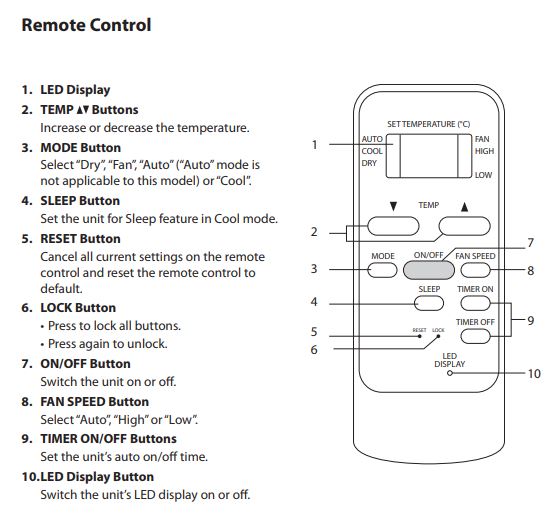
Logik Portable Air Conditioner Remote Control

Draining the Water

When the LED display shows “P1”, it means the bottom tray is full of water and needs draining. The unit will stop automatically and cannot be started until the water is drained.

  1. Move the unit to a drain location.
  2. Remove the bottom tray drain outlet cover and plug.
  3. After the water is fully drained, replace the plug and cover.
  4. Switch on the unit until “P1” disappears.

If “P1” continues to display, unplug the unit and call for a qualified service agent for assistance.

Logik Portable Air Conditioner Manual PDF

Comments

Popular posts from this blog

Rittal Air Conditioner Error Codes

  System messages are shown on the display screen of the Comfort controller via the displays A1 to A20 and E0. Rittal Air Conditioner Error Codes Error Codes System message Possible cause A1 Enclosure door open Door open or door limit switch incorrectly positioned A2 Internal temperature of enclosure too high Cooling capacity inadequate/unit undersized. Error as a consequence of messages A03 to A17. A3 Filter monitoring Filter mat soiled A4 Ambient temperature too high/too low Ambient temperature outside of admissible operating range (+10°C to +60°C) A5 Icing hazard Operational display in case of icing hazard. A6 PSAH pressure-operated switch Ambient temperature too high A7 Evaporator coil Lack of coolant; sensor in front of or behind condenser defective. A8 Condensate warning Condensate discharge kinked or blocked A9 Condenser fan blocked or defective Blocked or defective A10 Evaporator fan blocked or defective Blocked or defective A11 Compressor Compressor overloaded A12 Condense...

Panasonic VRF AC Error Codes and Troubleshooting

  Indoor unit is detecting error signal from remote controller (and system controller). Panasonic Mini VRF AC Error Codes and Troubleshooting Error Codes Meaning E01 Error in receiving serial communication signal. E02 Error in transmitting serial communication signal. E03 Indoor unit is detecting error signal from remote controller. E04 Error in receiving serial communication signal. When turning on the power supply, the number of connected indoor units does not correspond to the number set. E06 Error of the outdoor unit in receiving serial communication signal from the indoor unit. E08 Indoor unit address setting is duplicated. E09 Remote controller address connector. E12 Starting auto address setting is prohibited. This alarm message shows that the auto address connector CN-A.ADD is shorted while other RC line is executing auto address operation. E15 Error in auto address setting. E16 Error in auto address setting. E20 No indoor unit is connected during auto address setting. E24 ...

Vestel AC Error Codes and Troubleshooting

  Error Messages   are displayed, respectively by first the   Er   icon and then the special code (01, 02, …, 20, etc.) of the failure. In that case, do nothing to the air conditioner and contact with the Authorised Service.   Er11   and   Er13   are not error messages. If you see these messages, apply the steps under the following protection messages section. Vestel AC Error Code and Troubleshooting Error Codes Cause dF The icing on the outdoor unit is being defrosted. After the defrosting operation is accomplished, your air conditioner will continue to operate in the heating mode, the product should not be turned off while this mode is enabled. RE Make the arc control for your electrical wiring, if the problem is not fixed call for the service. If the problem comes out very frequently, contact with the authorised service. Sr In case of certain failures, in order to not to spoil you comfort, your air conditioner continues to operate despite the f...